

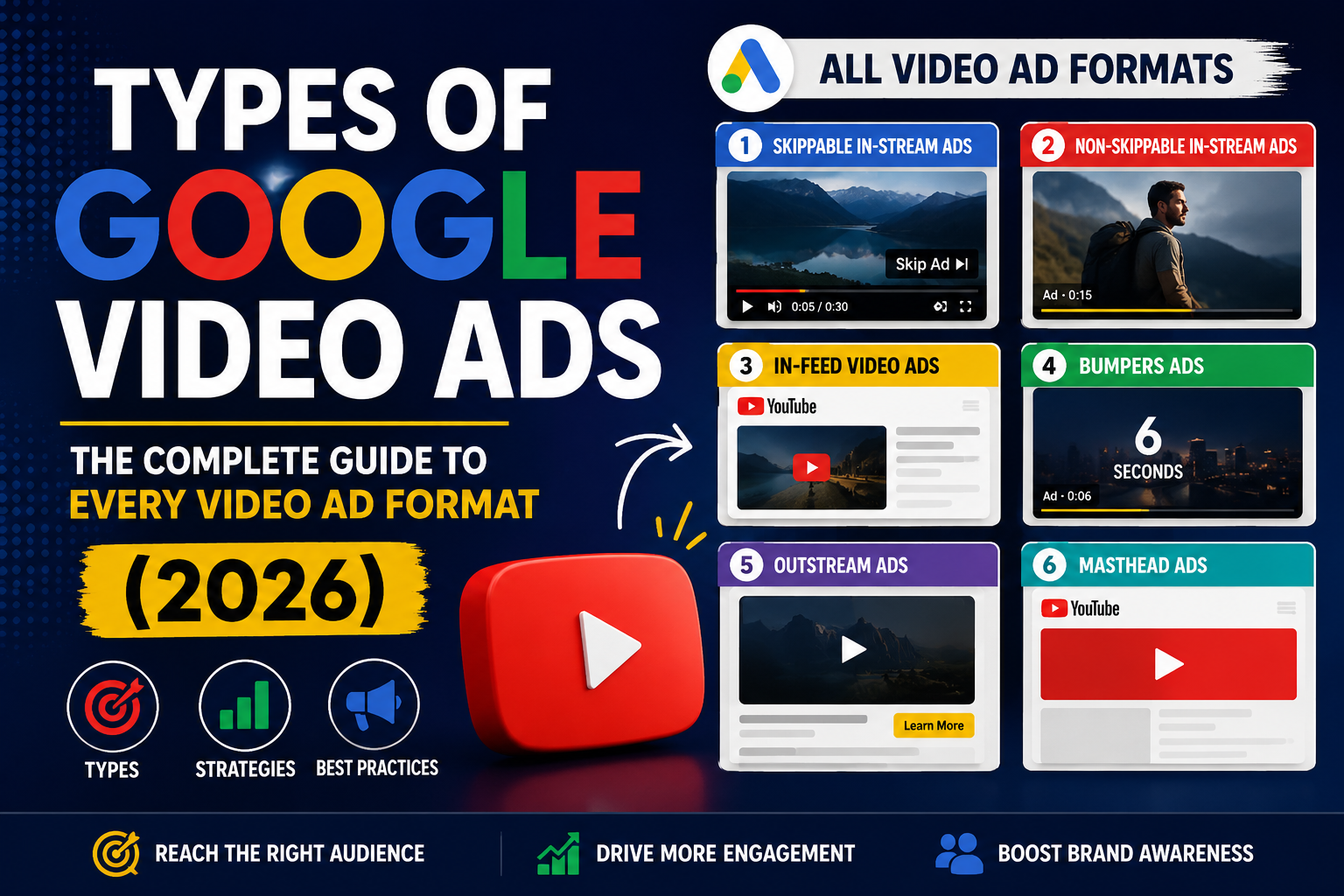
Here is something that trips up almost every business owner I talk to. They open Google Ads, click on Video, and get hit with a wall of formats. Skippable this, non skippable that, bumper, in feed, Shorts, outstream. No explanation of which one actually gets them customers Types of Google Video Ads
So they either pick randomly and waste budget, or they just give up and stick to Search ads.
I have set up video campaigns for clients across Hyderabad and Vizag, everything from hair studios to service businesses, and I can tell you this confusion costs people real money. Choosing the wrong format for your goal is like using a hammer to fix a leaking tap. Wrong tool, wasted effort.
This guide breaks down every Google video ad format that actually exists in 2026, what each one is built for, and how to pick the right one without burning your budget on trial and error.
Table of Contents
ToggleIntroduction Types of Google Video Ads
Google video ads run mainly on YouTube, though some formats stretch across Google video partner sites too. Each format has its own rules around skippability, length, billing, and where it shows up.
Why does this matter so much? Because Google does not have one video ad. It has a whole toolkit. Pick the right piece and you get views, leads, and sales at a cost that makes sense. Pick the wrong piece and you get skipped in five seconds flat.
By the end of this post you will know exactly which format fits your goal, what each one costs to run, and a few mistakes I see people make over and over again.
Quick Answer
Google offers seven core video ad formats: skippable in stream, non skippable in stream, bumper ads, in feed video ads, YouTube Shorts ads, outstream ads, and Masthead ads. Skippable in stream works best for most advertisers because you only pay when someone actually watches. Bumper ads suit quick awareness pushes, and in feed video ads work well for consideration stage campaigns where people choose to click and watch.
What Are Google Video Ads?
Google video ads are video based advertisements that run on YouTube and across Google’s video partner network. You set them up through Google Ads, and depending on the format you choose, they can play before a video, in the middle of one, inside the YouTube feed, or on Shorts.
Think of it like this. A billboard shows the same message to everyone driving past. A Google video ad shows a different message to different people based on what they searched, what they watch, and what they are likely to buy. That targeting is the whole reason video ads on Google outperform plain billboard style advertising most of the time.
A quick real world example. One of my clients runs a non surgical hair replacement studio. We ran a fifteen second skippable ad targeting people who had recently searched things like hair fall solutions or hair patch cost. That single targeting layer, built on real search intent, is something a TV ad or a random Instagram boost could never replicate.
Why Video Ad Format Selection Actually Matters
People treat format selection as a technical detail. It is not. It decides your cost, your reach, and whether your message even gets watched.
Choose a skippable format for a brand new product launch and most viewers will skip before they understand what you are selling. Choose a bumper ad when you actually need to explain something complex and you will run out of time before you make your point.
The right format lines up with where the viewer sits in their buying journey. Someone who has never heard of your brand needs a different approach than someone who visited your website last week and is comparing options.
Get this right and your cost per view drops, your click through rate climbs, and your ad spend actually turns into customers instead of impressions nobody remembers.
The Complete Guide To Every Google Video Ad Format
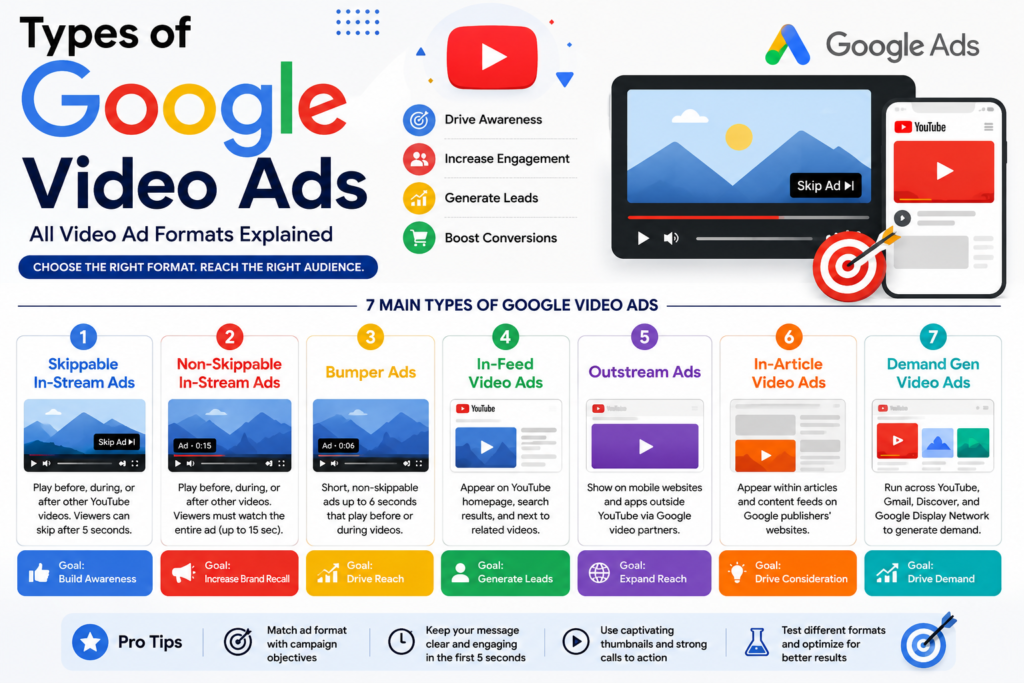
1. Skippable In Stream Ads
What It Means These are the ads that play before, during, or after other YouTube videos, and after five seconds the viewer gets the option to skip.
Why It Matters This is the most flexible and widely used video format on Google Ads. It works across desktop, mobile, and connected TV, and it supports pretty much every campaign goal you can think of, from sales to plain brand awareness.
How To Do It Set up a Video campaign in Google Ads, choose your goal, upload a video hosted on YouTube, and set your bidding to CPV or Smart Bidding depending on what you are optimizing for. With CPV bidding you only pay when someone watches thirty seconds, watches the whole video if it is shorter, or interacts with the ad, whichever happens first.
Example A local gym running a skippable ad showing a quick before and after transformation story, with a clear CTA to book a free trial class.
Pro Tip Put your strongest hook in the first five seconds. If people are not curious by second five, they are gone, and you have already paid for the impression.
2. Non Skippable In Stream Ads
What It Means These play before, during, or after other videos and viewers cannot skip them. They run up to sixty seconds, though most advertisers keep them closer to fifteen for better completion and recall.
Why It Matters When you absolutely need your full message seen, this is the format. No skip button means guaranteed exposure, which matters for brand awareness campaigns where recall is the goal, not clicks.
How To Do It Choose the awareness and consideration objective in Google Ads, upload your video, and bidding runs on target CPM, meaning you pay based on impressions rather than views.
Example A festival season sale ad for a hair studio, showing the offer clearly in the first ten seconds since viewers cannot skip past it anyway.
Pro Tip Because people cannot skip, do not waste this format on a boring pitch. Annoying an audience that is forced to watch can actually hurt brand perception more than it helps.
3. Bumper Ads
What It Means Short, non skippable ads capped at six seconds. Built for one thing only, a quick memorable hit of awareness.
Why It Matters Attention spans are short and getting shorter. Bumper ads respect that reality. They work great stacked alongside longer formats as part of a sequenced campaign, reinforcing a message someone already saw in a longer ad.
How To Do It Upload a short video asset, keep the message down to one single idea, and use target CPM bidding since you are again paying on impressions.
Example A quick six second clip showing just a logo, a tagline, and a phone number or WhatsApp CTA, run as a reminder ad to people who already viewed your longer video.
Pro Tip Do not try to cram a full pitch into six seconds. Pick one message, say it clearly, and let the format do what it does best.
4. In Feed Video Ads
What It Means Formerly known as TrueView Discovery, these show up as a thumbnail with text inside YouTube search results, next to related videos, or on the YouTube homepage. The viewer chooses to click and watch.
Why It Matters Because the viewer opts in by clicking, people who watch tend to be genuinely interested. This makes in feed video ads strong for consideration stage campaigns, especially in service based businesses where trust matters before someone buys.
How To Do It Upload your video, write a compelling thumbnail headline and description, and Google will place it in relevant discovery spots based on search behavior and viewing history.
Example A detailed explainer video on how non surgical hair replacement works, shown as an in feed ad to people who recently searched hair patch treatment options.
Pro Tip Your thumbnail and headline do the heavy lifting here, not the video itself. If those two do not earn the click, the best video in the world will not get watched.
5. YouTube Shorts Ads
What It Means Vertical, short form video ads that appear between organic Shorts content, matching the native feel of the format.
Why It Matters Shorts consumption on YouTube has grown massively, and mobile first vertical ads meet people exactly where their attention already is. Ignoring Shorts in 2026 means ignoring one of the fastest growing viewing habits on the platform.
How To Do It Shoot vertical from the start, in a 9:16 ratio. Do not just crop a horizontal video, since that usually cuts off the subject or the key message. Upload through Demand Gen or Video Reach campaigns, both of which include Shorts placement.
Example A quick, casual style Tenglish reel voiceover style ad showing a real client walkthrough at a hair studio, feeling native to the Shorts scroll rather than a polished commercial.
Pro Tip Shorts audiences scroll fast and expect casual, authentic content, not a studio production. Overly polished ads often perform worse here than something that feels shot on a phone.
6. Outstream Ads
What It Means Mobile only video ads that play with the sound off by default, appearing on websites and apps within the Google video partner network, not on YouTube itself.
Why It Matters Outstream extends your video reach beyond YouTube onto mobile web and app inventory, which is useful when you want broader reach without competing purely for YouTube placements.
How To Do It Enable outstream within your video campaign settings. Since sound starts off, design your video to communicate visually, with captions or on screen text carrying the message.
Example A product demo with bold captions across the screen, so the message lands even if someone is scrolling with their phone on silent, which is most of the time.
Pro Tip Never assume sound will be on. Design every outstream ad assuming the viewer is watching muted, because statistically, they usually are.
7. Masthead Ads
What It Means A reserved, premium ad slot that autoplays at the top of the YouTube homepage, typically for up to thirty seconds, in a 16:9 format.
Why It Matters This is the biggest visibility play Google offers on YouTube. It is not self serve, you generally need a Google sales rep to book it, and it usually comes with a bigger budget commitment.
How To Do It Reach out through a Google Ads representative or an approved partner to book Masthead inventory for a specific date and audience.
Example A major brand launch or product reveal, where the goal is maximum reach within a short window, not everyday campaign management.
Pro Tip Most small and medium businesses will never need this format. It is worth knowing it exists, but budget it only for genuinely big moments.
Where These Formats Fit Inside Campaign Types
Google groups these formats under a few campaign types, and knowing which one to pick matters just as much as picking the ad format itself.
Demand Gen is currently the main self serve, conversion focused option after Video Action Campaigns were retired in April 2026. It runs across YouTube, Discover, and Gmail, and it supports in feed, in stream, and Shorts placements.
Video Reach Campaigns optimize for maximum unique reach across bumper, skippable in stream, non skippable, in feed, and Shorts formats, all from one single campaign.
Performance Max pulls in video alongside Search, Display, Shopping, Gmail, and Maps, letting Google’s AI decide where your assets perform best.
If your goal is straightforward reach and awareness, Video Reach Campaigns keep things simple. If you want conversions and are comfortable letting Google’s AI handle a chunk of the decision making, Demand Gen or Performance Max tend to work better.
Common Mistakes Advertisers Make With Video Ad Formats
Mistake: Using the same video across every format without adjusting for length or orientation.
Impact: A sixty second ad squeezed into a six second bumper slot, or a horizontal video awkwardly cropped for Shorts, both hurt performance and look unpolished.
Solution: Create format specific cuts. A single hero video should have a 16:9 version, a 9:16 version, and a trimmed six second cut for bumpers.
Mistake: Choosing non skippable ads just because they guarantee views.
Impact: Forced viewing without a genuinely useful message annoys people and can quietly damage brand perception over time.
Solution: Save non skippable formats for short, high value messages, and use skippable formats for anything that needs more explanation.
Mistake: Ignoring captions on outstream and Shorts ads.
Impact: Since these often play muted by default, a message that depends entirely on audio gets lost completely.
Solution: Always add burned in captions or clear on screen text so the message lands with sound off.
Best Practices For Google Video Ads In 2026
Prepare your creative in multiple aspect ratios from the start, covering 16:9, 9:16, and 1:1, so you are never scrambling to adapt one asset across every placement.
Front load your hook. Whatever format you choose, assume you have about five seconds before someone decides whether to keep watching.
Sequence your formats. Run a longer skippable ad for awareness, follow it up with a bumper for reminder impressions, and let retargeting handle the rest.
Match format to funnel stage. Top of funnel awareness suits bumper and non skippable ads. Consideration stage suits in feed video. Bottom of funnel retargeting suits skippable in stream with a strong, direct CTA.
Tools And Resources
| Tool | Best For | Notes |
|---|---|---|
| Google Ads Video Campaign Builder | Setting up any format covered here | Native to Google Ads, no extra cost |
| YouTube Studio | Hosting and managing video assets | Required since all video ads must be hosted on YouTube |
| Canva or CapCut | Creating format specific cuts quickly | Useful for Shorts and bumper edits without a full editing suite |
| Google Ads Editor | Bulk campaign management | Handy once you are running multiple formats at scale |
Real Life Example
Situation: A hair replacement studio in Vizag wanted more walk ins during a slow month.
Challenge: Their previous approach relied only on static image ads on Meta, and video was completely untested on Google.
Action: We built a fifteen second skippable in stream ad targeting people who had searched hair fall and hair patch related terms in the past thirty days, paired with a six second bumper ad for retargeting people who had watched the longer ad but not clicked.
Result: The skippable ad pulled a strong view rate because it opened with a real before and after result in the first three seconds, and the bumper retargeting brought back a noticeable chunk of people who converted through a WhatsApp DM HAIR call to action.
Expert Tips
Do not treat video ad copy the same way you treat a Google Search ad. Search ads answer a query. Video ads have to earn attention first, then deliver the message.
Test your first five seconds separately from the rest of your video. Small changes at the very start often move performance more than changes anywhere else in the ad.
Use custom intent audiences built from actual Google search terms your best customers used. This tends to outperform broad interest based targeting by a wide margin.
Frequently Asked Questions
What is the most common type of Google video ad?
Skippable in stream ads are the most widely used format since they work across almost every campaign goal and only charge when someone actually watches or interacts.
How long can a non skippable YouTube ad be?
Non skippable in stream ads can run up to sixty seconds, though most advertisers keep them shorter for better completion rates.
What happened to TrueView ads?
TrueView is no longer an active format name. TrueView in stream became skippable in stream ads, and TrueView Discovery became in feed video ads.
Are overlay ads still available on Google Ads?
No. Overlay ads ended in April 2023 and are no longer a live format, even though some older guides still list them.
What is the difference between in stream and in feed video ads?
In stream ads play before, during, or after another video automatically. In feed video ads show as a thumbnail that the viewer has to click before the video plays.
Can I run video ads without a YouTube channel?
Your video needs to be hosted on YouTube to run as an ad, but you do not need a public facing, actively posting channel to do it.
What is the cheapest Google video ad format to run?
Bumper ads and non skippable ads typically use lower cost per impression bidding, but cost effectiveness really depends on your targeting quality, not just the format.
Do Shorts ads need a different video than regular YouTube ads?
Yes, ideally. Shorts perform best with vertical, native feeling content rather than a cropped horizontal video.
What replaced Video Action Campaigns?
Video Action Campaigns were retired in April 2026, and Demand Gen is now the main self serve conversion focused video product.
Is Masthead worth it for small businesses?
Rarely. It is a premium, reserved placement best suited to large scale product launches, not everyday small business advertising.
Key Takeaways
- Google offers seven core video ad formats, each built for a different stage of the buyer journey
- Skippable in stream ads are the most flexible and widely used option for most advertisers
- Non skippable and bumper ads guarantee exposure but need short, sharp messaging
- In feed video ads work well for consideration stage campaigns where viewers opt in by clicking
- Shorts ads need native, vertical content, not a cropped version of a horizontal video
- Outstream ads play muted by default, so captions are essential
- Masthead is a premium, reserved format mostly suited to big brand launches
- Video Action Campaigns retired in April 2026, with Demand Gen now handling that role
Conclusion
Google video ads are not one single tool, they are a whole toolkit, and picking the right piece for the right job is what separates a campaign that gets skipped from one that actually drives business.
Start with your goal. Awareness, consideration, or conversion. Match that goal to the format built for it, keep your creative sharp for the first five seconds, and adjust your assets for every aspect ratio the format needs.
Get that sequence right and video stops being a guessing game. It becomes one of the more reliable channels in your marketing mix.
CTA
If you are running a business in Hyderabad or Vizag and want help figuring out which video ad format actually fits your goals and budget, reach out and let us map it out together before you spend a single rupee on the wrong format.