

A business owner once told me he spent every Sunday evening manually sending follow-up emails to leads. Not writing them. Not strategizing. Just copying, pasting, and clicking send. Over and over again.
That was six hours of his weekend. Every single week.
He thought it was just part of running a business. It is not. That is a workflow problem. And AI automation solved it in under two hours of setup.
This is not a fantasy. Businesses across industries are quietly recovering entire workdays by letting AI handle the repetitive, low-thinking work that nobody should be doing manually anymore.
Table of Contents
ToggleIntroduction
AI automation is not about replacing your team or turning your business into some robotic system nobody wants to interact with. It is about freeing up time so the people in your business can actually do the work that matters.
The businesses using AI automation right now are not giant corporations with deep tech budgets. Many of them are small and mid-size companies that got tired of doing things the slow way.
In this guide, you will see exactly where those hours are being saved, how AI automation actually works in practice, the mistakes most businesses make when they start, and what tools are worth your attention right now.
Quick Answer
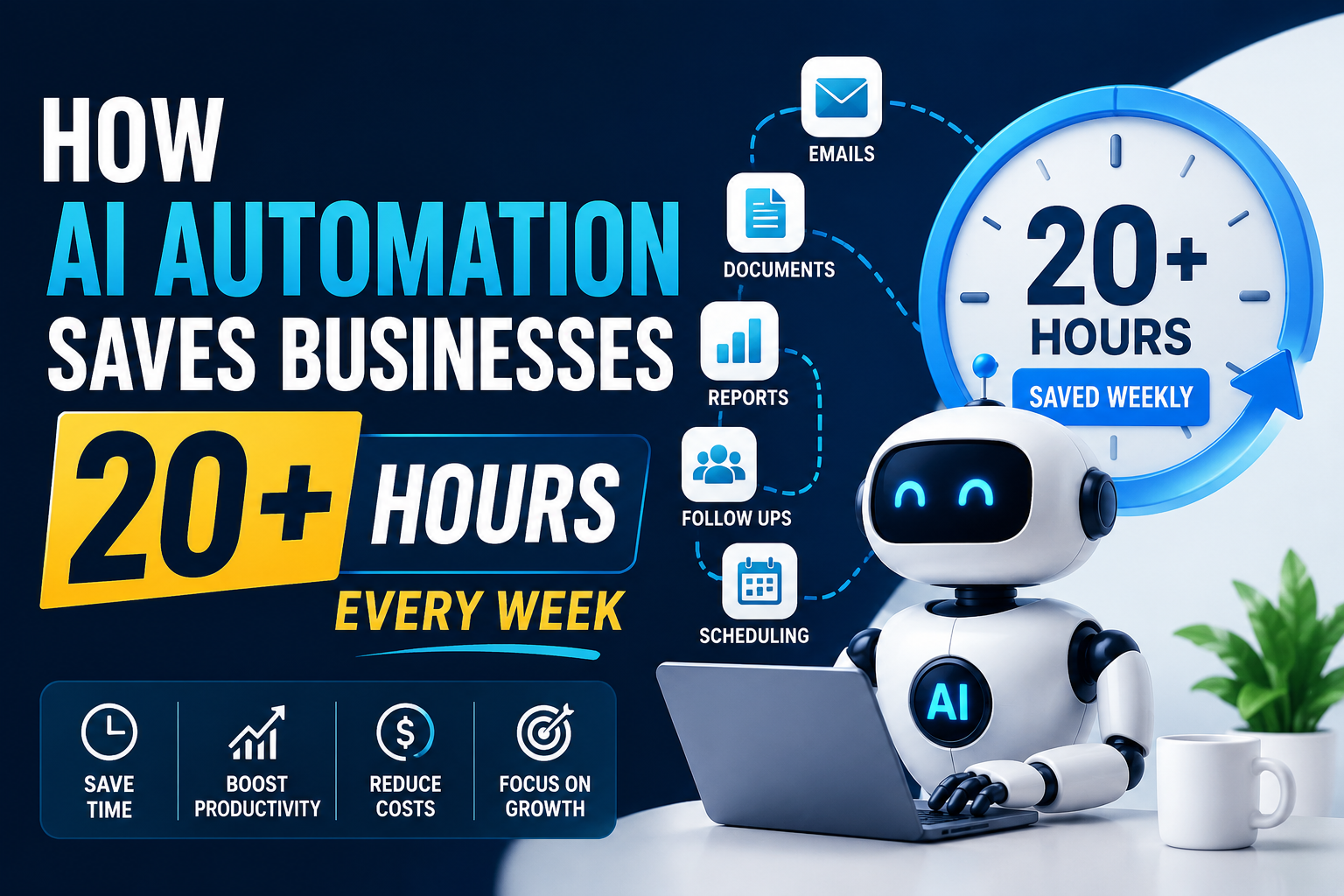
AI automation saves businesses 20 or more hours per week by handling repetitive tasks like email responses, data entry, lead follow-up, report generation, customer support, and social media scheduling. Tools like Zapier, Make, and AI-powered CRMs can automate these workflows in days, not months, without requiring any coding knowledge.
What Is AI Automation?
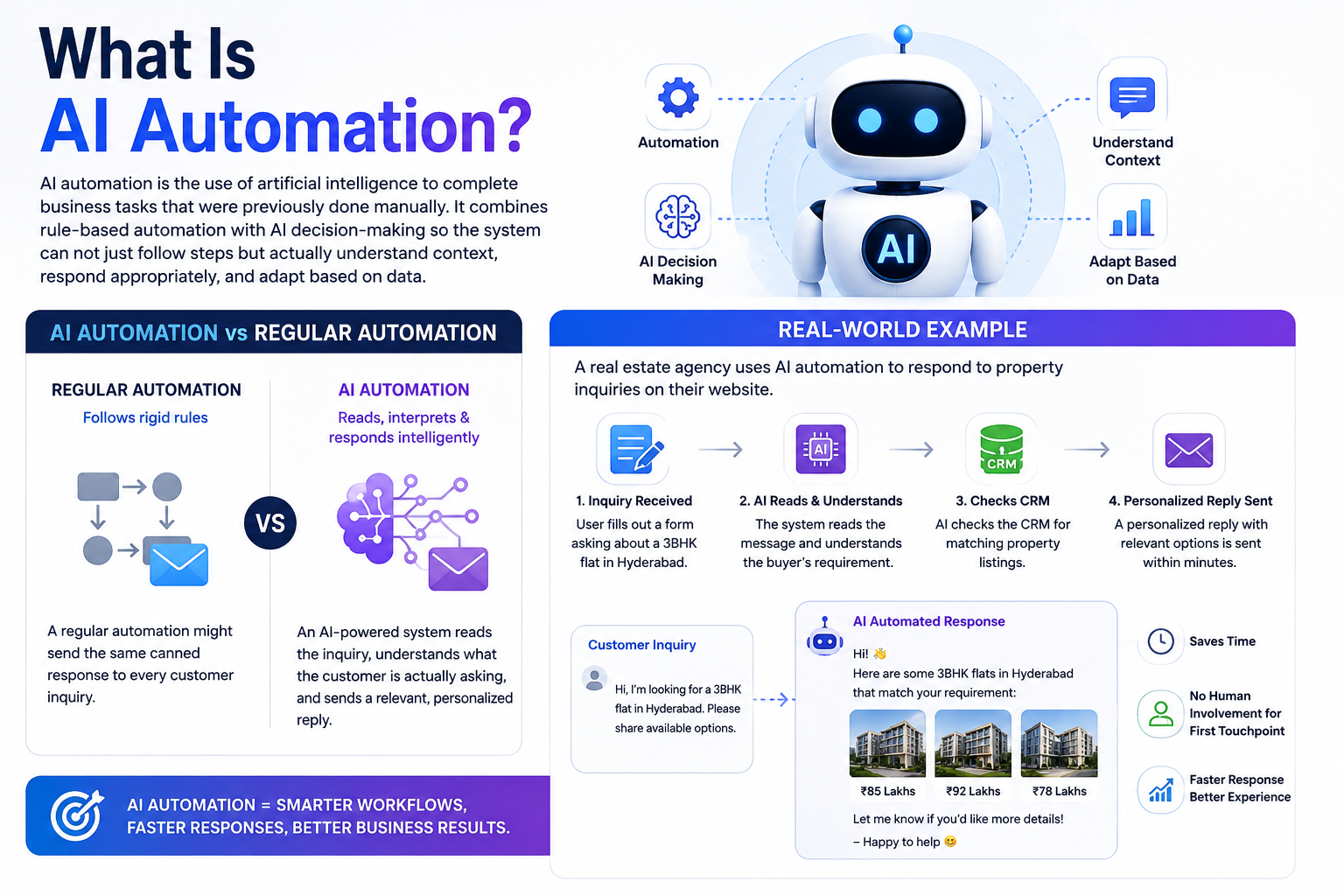
AI automation is the use of artificial intelligence to complete business tasks that were previously done manually. It combines rule-based automation with AI decision-making so the system can not just follow steps but actually understand context, respond appropriately, and adapt based on data.
The difference between regular automation and AI automation is this: regular automation follows rigid rules. AI automation can read, interpret, and respond intelligently.
A regular automation might send the same canned response to every customer inquiry. An AI-powered system reads the inquiry, understands what the customer is actually asking, and sends a relevant, personalized reply.
Real-world example: A real estate agency uses AI automation to respond to property inquiries on their website. When someone fills out a form asking about a 3BHK flat in Hyderabad, the system reads the message, checks the CRM for matching listings, and sends a personalized reply with relevant options within minutes. No human involvement required for that first touchpoint.
Why Businesses Are Losing Hours Without Even Realizing It
Most businesses do not have one massive time-wasting problem. They have ten small ones.
Responding to repetitive customer queries. Manually pulling weekly reports. Moving data between tools. Sending follow-up messages to leads who never replied. Scheduling social media posts one by one. Chasing invoices.
None of these take hours on their own. But stack them up across a week, and you are looking at 20 to 30 hours of work that could be handled automatically.
The problem is most business owners do not track this time. It just disappears into the background as part of running things. AI automation makes that time visible and then gives it back.
Where AI Automation Actually Saves Time: A Realistic Breakdown
Customer Communication and Support
This is usually the biggest win. AI chatbots and automated response systems handle first-level customer queries, FAQ responses, appointment bookings, and complaint acknowledgments without any human needing to step in.
What it means: Your team stops being a call center for questions that have already been answered on your website.
How to do it: Tools like Tidio, Intercom, or even WhatsApp Business API with AI integration can handle this. Set up a trained chatbot with your most common queries. Connect it to your CRM so it logs every interaction.
Example: A hair studio in Hyderabad using an AI chatbot on their Instagram and website handles over 80 percent of appointment-related queries automatically. The receptionist now focuses on in-studio experience rather than answering the same booking questions all day.
Time saved: 5 to 8 hours per week on average.
Pro Tip: Train your chatbot on real customer conversations. Do not write scripted FAQ answers from scratch. Pull from actual inquiries you have received. The responses will feel far more natural.
Lead Follow-Up and Nurturing
Most businesses lose leads not because the lead was bad but because the follow-up was slow or inconsistent. AI automation fixes this without making it feel robotic.
What it means: Every lead that enters your funnel gets an immediate, relevant response and a proper follow-up sequence automatically.
How to do it: Connect your lead forms to a CRM like HubSpot or Zoho. Set up automated email or WhatsApp sequences triggered by lead actions. Use AI tools to personalize these messages based on what the lead inquired about.
Example: A digital marketing agency sets up a 5-step email sequence for every new lead. Day 1 is an intro and case study. Day 3 is a relevant blog post. Day 5 is a soft call to action. This runs automatically while the team focuses on closing warm leads.
Time saved: 4 to 6 hours per week.
Pro Tip: Add a human touchpoint in the middle of the sequence. Automation handles the first and last steps. A real message from a real person in between improves conversion significantly.
Data Entry and Report Generation
If someone in your business is manually moving data from one spreadsheet to another or building the same weekly report from scratch every week, that is fixable in a few hours of setup.
What it means: Your analytics, sales numbers, and performance reports compile themselves. Your team reads insights instead of building tables.
How to do it: Use Zapier or Make to connect your tools. Build automated dashboards in Google Looker Studio or Power BI that pull live data. Use AI tools like Notion AI or ChatGPT with API access to summarize reports automatically.
Example: A retail business connects their sales data to Looker Studio. Every Monday morning, a complete weekly performance report is ready without anyone touching a spreadsheet. The manager reviews and acts instead of spending three hours compiling numbers.
Time saved: 3 to 5 hours per week.
Pro Tip: Before building automation, clean your data sources. Automating messy data just creates messy reports faster.
Social Media Scheduling and Content Repurposing
Creating content and managing posting schedules manually is one of the most avoidable time drains in modern marketing.
What it means: Your content calendar runs on autopilot. Posts go out at the right times. Old content gets repurposed into new formats without starting from scratch.
How to do it: Use tools like Buffer, Later, or Publer for scheduling. Use AI tools to repurpose blog posts into Instagram captions, LinkedIn summaries, and short video scripts. Batch your content creation in one session and let the tool handle distribution.
Example: A clinic in Vizag creates one long-form blog post every two weeks. AI tools convert it into six social media posts, a short video script, and a newsletter section. One piece of content becomes seven. Total additional time: 30 minutes.
Time saved: 3 to 4 hours per week.
Pro Tip: Build a content repurposing prompt in ChatGPT that matches your brand voice. Save it. Run every blog post through it. Consistency without effort.
Invoice and Payment Follow-Up
Chasing payments is awkward, time-consuming, and completely automatable.
What it means: Your invoicing system sends reminders, follows up on overdue payments, and updates records without anyone making uncomfortable calls or sending manual emails.
How to do it: Use tools like Razorpay, QuickBooks, or Zoho Books. Set up automated payment reminders at 3 days before due, on the due date, and 3 days after. Use polite, pre-written templates that do not feel aggressive.
Time saved: 2 to 3 hours per week.
Common Mistakes Businesses Make With AI Automation
Automating Too Much Too Fast
Mistake: Businesses get excited and try to automate everything at once.
Impact: Systems break, customers get wrong responses, and the team spends more time fixing automation than doing manual work.
Solution: Start with one workflow. Get it working properly. Then expand.
Not Reviewing AI Outputs
Mistake: Setting up automation and assuming it will always get things right.
Impact: Customers receive irrelevant or incorrect responses. Brand trust takes a hit.
Solution: Set a monthly review of your automated workflows. Check responses, update templates, and catch anything that has drifted out of accuracy.
Choosing Tools Before Defining the Problem
Mistake: Signing up for five AI tools because they look impressive, without knowing what problem they are solving.
Impact: Wasted subscription money and a confused team.
Solution: List your biggest time-drains first. Then find the tool that solves that specific problem.
Skipping the Human Layer
Mistake: Full automation with no human touchpoints in customer journeys.
Impact: Customers feel like they are talking to a machine. Especially problematic in service businesses.
Solution: Use automation for efficiency but keep human moments in the experience where it matters. A personal message at the right time is worth more than ten automated ones.
Best Practices for AI Automation That Actually Works
Start small, prove the value, then scale. One automated workflow saving 5 hours a week is a strong foundation. Rushing to ten workflows at once usually creates more problems than it solves. Document everything. Build a simple SOP for every automation you set up. What it does, how it is triggered, what happens if it fails. Your team will thank you when something needs fixing. Use AI to enhance human work, not replace it. The best automation setups amplify what your people are good at. They handle the repetitive parts so humans can focus on thinking, relationship-building, and creative problem-solving.
Review your automations regularly. Tools update. APIs change. What worked six months ago might need adjusting. A quarterly review takes 2 hours and prevents expensive errors.
Tools Worth Your Attention
| Tool | Best For | Price Range |
|---|---|---|
| Zapier | Connecting apps and automating workflows | Free to INR 8,000 per month |
| Make (formerly Integromat) | Complex multi-step automations | Free to INR 5,000 per month |
| HubSpot CRM | Lead management and follow-up automation | Free plan available |
| Tidio | AI chatbot for websites and WhatsApp | Free to INR 3,500 per month |
| Buffer | Social media scheduling | Free to INR 2,500 per month |
| Notion AI | Document and report summarization | INR 800 per month add-on |
| Zoho Books | Invoice and payment automation | INR 1,500 per month |
| ChatGPT API | Custom AI workflows and content | Pay per use |
Real-Life Example: How a Hyderabad Clinic Recovered 22 Hours Per Week
Situation: A skin and hair clinic in Hyderabad with a team of five. Doctors focused on treatments. The front desk handled everything else.
Challenge: The admin team was spending hours every day on appointment confirmations, lead follow-ups from Instagram, payment reminders, and weekly report compilation. They were constantly behind. Leads were going cold. The team was stretched.
Action: The clinic worked with a digital marketing agency to implement three automation workflows. First, a WhatsApp Business API chatbot handled all appointment booking queries and confirmations. Second, a Zoho CRM automation sent follow-up messages to every lead within 5 minutes of inquiry and continued a 4-message sequence over 10 days. Third, a Google Looker Studio dashboard compiled weekly patient and revenue data automatically every Monday.
Result: The front desk recovered 22 hours per week. Leads that previously went cold now converted 35 percent more often because of faster follow-up. The admin team shifted to patient experience improvements instead of inbox management. Revenue increased 18 percent over the next quarter.
This was not a tech overhaul. It was three focused automations that solved three real problems.
Expert Tips From the Field
The businesses saving the most time with AI automation are not using the fanciest tools. They are using simple tools very well. Do not overcomplicate it. Automation works best on tasks that happen repeatedly in exactly the same way. If a task requires judgment, creativity, or relationship context, that is a human job. If it is the same thing done again and again, automate it. Track the hours you save from automation the same way you track revenue. It is actual business value. A workflow that saves 5 hours per week at a billing rate of INR 2,000 per hour is worth INR 40,000 per month. That changes how you think about investing in these tools.
Your first automation will feel slow to set up. Your second will be faster. By your fifth, you will see workflows everywhere that need fixing.
Frequently Asked Questions
What is AI automation for businesses?
AI automation is the use of artificial intelligence tools to handle repetitive business tasks like customer communication, lead follow-up, data entry, scheduling, and report generation without manual human effort.
How much time can AI automation realistically save?
Most small and mid-size businesses save 15 to 30 hours per week after implementing 3 to 5 automated workflows. The exact number depends on which tasks are automated and how consistently they occur.
Do I need technical knowledge to set up AI automation?
No. Tools like Zapier, Make, and most AI chatbots are designed for non-technical users. Basic setup requires no coding. Complex custom workflows may benefit from developer support.
What business tasks should I automate first?
Start with your most repetitive high-volume tasks. For most businesses this means customer inquiry responses, lead follow-up, and invoice reminders. These give the fastest time savings with the lowest setup complexity.
Is AI automation expensive for small businesses?
Most essential automation tools start free or under INR 3,000 per month. The return on investment is usually visible within the first month if the right workflows are automated.
Can AI automation hurt customer experience?
Only if it is implemented poorly. Automation that responds slowly, sends irrelevant messages, or removes all human contact will hurt experience. Automation that is fast, relevant, and enhanced by human touchpoints improves it.
What is the difference between AI automation and regular automation?
Regular automation follows fixed rules. AI automation can understand context, personalize responses, and adapt based on data. For example, a regular automation sends the same email to every lead. AI automation reads the lead’s behavior and sends the most relevant message.
How long does it take to set up AI automation?
Basic workflows take 2 to 4 hours to set up. A full multi-workflow automation system for a small business can be implemented in 2 to 3 weeks with proper planning.
Which industries benefit most from AI automation?
Clinics, real estate agencies, retail businesses, digital marketing agencies, e-commerce stores, education providers, and hospitality businesses see the highest time savings from automation.
Will AI automation replace my employees?
No. AI automation replaces repetitive low-value tasks, not people. It frees your team to focus on work that actually requires human intelligence, relationships, and creativity.
Key Takeaways
- Businesses lose 20 to 30 hours weekly to repetitive tasks that AI automation can handle
- The biggest time savings come from customer communication, lead follow-up, data reporting, social media scheduling, and invoice management
- Start with one workflow, prove the value, then expand
- Use tools that match your actual problems, not tools that sound impressive
- Keep human touchpoints in your customer journey even when automating heavily
- Review your automations quarterly to keep them accurate and effective
- Track time saved the same way you track revenue
Conclusion
The businesses that feel constantly overwhelmed are not usually working harder than everyone else. They are just doing more manual work than they need to. AI automation closes that gap.
You do not need a massive budget or a dedicated tech team to start. You need a clear picture of where your time is actually going and a willingness to spend a few hours setting up systems that will save you weeks over the course of a year.
Start with the task that annoys you most. Build one automation. Get it running. Then look for the next one.
The time you get back is not just free time. It is thinking time, growth time, and the kind of focused work that actually moves your business forward.
Ready to Stop Doing It the Hard Way?
At NexasAI, we help businesses in Hyderabad and Visakhapatnam set up AI automation systems that actually work. No bloated tech stacks, no unnecessary complexity. Just practical workflows that save real hours and create real results.
If you want to know exactly where your business is losing time and what can be automated, reach out to us. We will map it out together.