

The problem nobody talks about
Here’s something that happened to a client of ours last year. Their blog had decent rankings, steady traffic, the usual stuff. Then Google rolled out AI Overviews everywhere, and overnight their click-through rate on certain queries dropped by more than half. The content was still ranking. People just weren’t clicking anymore, because the AI answer at the top of the page was already giving searchers what they needed.
That’s the world small businesses are operating in right now. Search hasn’t disappeared, but it’s split into two games at once: ranking in classic blue links, and getting mentioned or cited inside AI-generated answers on ChatGPT, Gemini, Perplexity, and Google’s AI Mode. Trying to manage both manually, with no team and a tight budget, is close to impossible. Which is exactly why AI SEO tools matter more this year than they did even twelve months ago.
This guide breaks down which tools are actually worth paying for if you’re running a small business, what each one does well, where it falls short, and how to put together a stack that doesn’t bleed your budget dry.
Table of Contents
ToggleQuick answer
The best AI SEO tools for small businesses in 2026 combine three things: a research and tracking platform like Semrush or SE Ranking, a content optimization tool like Surfer SEO or Rank Math, and at least one AI visibility tracker such as Otterly to see how your brand shows up inside ChatGPT and Perplexity answers. Most small businesses can run a solid stack for under 150 dollars a month.
What are Best AI SEO Tools for Small Businesses in 2026 really
AI SEO tools use machine learning and large language models to handle tasks that used to take hours of manual digging: finding keyword opportunities, scoring content against what’s already ranking, auditing technical issues, and now, tracking whether AI chatbots are citing your business at all.
Think of it this way. A traditional SEO tool tells you “this page is missing H2 tags.” An AI SEO tool tells you “this page is missing the kind of structured, direct-answer content that AI Overviews tend to pull from, and here’s what a competing page that does get cited looks like.” That second layer, sometimes called GEO (generative engine optimization) or AEO (answer engine optimization), is the part that’s genuinely new in the last year or two.
A small hair salon owner using one of these tools doesn’t need to know how large language models work. They just need the tool to tell them what to fix and why it matters for getting found.
Why this matters more in 2026 than it did before
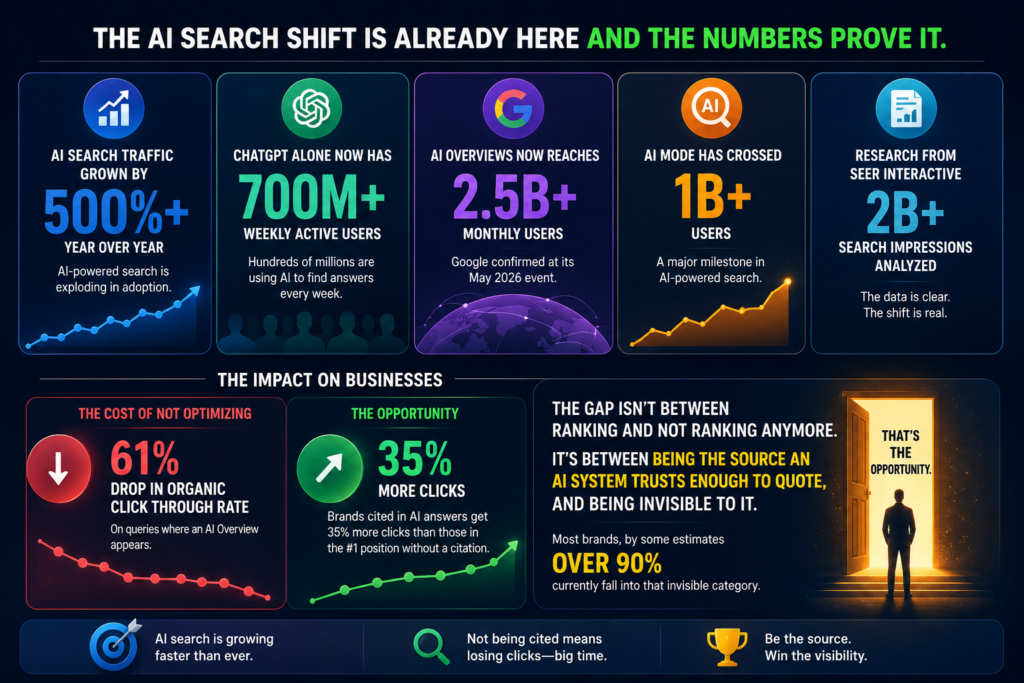
The numbers behind this shift are hard to ignore. AI search traffic has grown by more than 500 percent year over year, and ChatGPT alone now sees over 700 million weekly active users. Google itself confirmed at its May 2026 event that AI Overviews now reaches roughly 2.5 billion monthly users, with AI Mode crossing the 1 billion mark.
That growth comes at a cost for businesses that aren’t optimized for it. Research from Seer Interactive, looking at over 2 billion search impressions, found that organic click through rate drops by around 61 percent on queries where an AI Overview appears. But here’s the part that should get a small business owner’s attention: brands that do get cited inside those AI answers see roughly 35 percent more clicks than a brand sitting in the old position one slot without a citation.
So the gap isn’t between ranking and not ranking anymore. It’s between being the source an AI system trusts enough to quote, and being invisible to it entirely. Most brands, by some estimates over 90 percent, currently fall into that invisible category. That’s the opportunity.
How to choose the right AI SEO tool for your business
Step 1: Figure out your actual bottleneck
Before you open your wallet, get honest about what’s slowing you down. Is it that you don’t have time to write content? Is it that you write content but have no idea if it’s any good? Or is it that your site has technical issues you can’t even see? Each of those points to a completely different category of tool, and buying the wrong one is the single biggest waste of money in this space.
Pro tip: if you can’t answer this in one sentence, spend a week tracking where your time actually goes before buying anything.
Step 2: Match the tool to your budget tier, not the other way around
A lot of small business owners get pulled in by feature lists and end up on a 500-dollar-a-month plan when a 30-dollar tool would have solved 80 percent of the problem. Decide your ceiling first. If you’re spending more on SEO software than you are on the content itself, something’s off.
Example: a solo bakery owner doesn’t need Semrush’s enterprise tier with five team seats. They need one content tool and Google Search Console, which is free.
Step 3: Run the free trial like it’s your real workflow
Don’t just click around. Take one real blog post you need to write this month and run it through the tool from start to finish. If it doesn’t save you measurable time on that one piece, it won’t save you time at scale either.
Step 4: Add AI visibility tracking once your foundation is solid
If your site still has basic technical issues or thin content, AI visibility tools won’t help you yet. Fix the foundation first, then layer on tracking for how you show up in ChatGPT and Perplexity.
Step 5: Review and cut every quarter
Software subscriptions creep. Every three months, ask which tools you actually opened that week. Cancel the ones gathering dust.
Common mistakes small businesses make with AI SEO tools
One frequent mistake is chasing the content score. Tools like Surfer SEO give you a number from 0 to 100, and it’s tempting to write purely to hit 100. The impact is content that reads stiff and keyword-stuffed, the kind Google’s recent quality updates have specifically gone after. The fix is simple: treat the score as a checklist, not the finish line. Write for the person first, then check the score.
Another one is buying an all-in-one suite before you’ve outgrown the basics. A lot of owners sign up for a 200-dollar-a-month platform in month one, when Google Search Console and a free plugin like Rank Math would have covered everything they needed for the first six months.
A third mistake, and this one’s becoming more common, is ignoring AI visibility entirely because “ChatGPT isn’t a search engine.” It is, functionally, for a growing share of your customers. Skipping that tracking means flying blind on a channel that’s only going to get bigger.
Best practices that actually work
Keep your tool stack to three pieces, maximum, unless you’re managing several client accounts. One for research, one for content, one for tracking. Anything beyond that usually means overlapping features you’re paying for twice.
Lean on the free tools longer than feels comfortable. Google Search Console, Google Trends, and the free tier of Rank Math cover a surprising amount of ground for a business that’s just getting its content engine started.
When you do invest in a paid tool, commit to using it for at least 90 days before judging the ROI. SEO is slow by nature, and switching tools every six weeks because you haven’t seen rankings move yet is a common way small businesses waste money without realizing it.
Tools and resources: the actual comparison
Here’s how the tools we’d recommend stack up against each other.
Tool | Best for | Starting price | Standout AI feature |
Semrush One | All in one research and AI visibility | $199/month | Tracks AI prompt mentions across ChatGPT, Gemini, and SearchGPT alongside traditional rankings |
Surfer SEO | Content optimization | $99/month ($79 annual) | Real time Content Score plus AI Search Guidelines for citation friendly structure |
SE Ranking | Budget all in one suite | ~$103/month | Combines a 5.4 billion keyword database with AI visibility monitoring |
Rank Math | WordPress site owners | Free, Pro from ~$59/year | Content AI add on plus a built in AI search traffic tracker |
Ubersuggest | Solo owners and very tight budgets | $29/month or $290 lifetime | Tracks how often ChatGPT references your site |
Screaming Frog | Technical audits | Free up to 500 URLs | Connects to ChatGPT and Gemini to auto generate missing alt text and flag crawl issues |
Otterly | Dedicated AI visibility tracking | $29/month | Daily insights on where you’re mentioned across major AI engines |
Semrush One
Semrush has been the closest thing SEO has to a command center for years, and the Semrush One bundle now folds AI visibility tracking in alongside the keyword research, backlink data, and site audits it’s always done well. The advantage here is context: you’re not just told that ChatGPT mentions a competitor more often, you can trace that back to the actual web signals causing it. For a small business with even a modest content budget, that connective tissue between traditional SEO and AI visibility is genuinely useful. The downside is cost. Even the Starter tier sits at 199 dollars a month, which is a real number for a business just starting out.
Surfer SEO
Surfer’s whole reason for existing is the Content Editor, which scores your draft in real time against what’s currently ranking for your target keyword. It’s become something close to an industry standard for content teams who want a measurable way to judge whether a draft is “done.” The newer AI Search Guidelines feature pushes that scoring toward citation friendly structure, which matters now that AI Overviews are pulling from specific paragraphs rather than whole pages. Where it falls short: it’s not a backlink or technical audit tool, so you’ll still need something else alongside it, and the AI visibility add on costs another 95 dollars a month on top
SE Ranking
If Semrush feels like overkill for your size, SE Ranking is the practical middle ground. You get a genuinely large keyword and domain database, rank tracking across thousands of keywords daily, and AI visibility monitoring bundled into one subscription that costs roughly half what the bigger suites charge. It’s not as polished in any single area, but for a business that needs “good enough across everything” rather than “best in one thing,” it’s hard to beat on price.
Rank Math
For anyone running a WordPress site, and a huge number of small businesses are, Rank Math’s free tier alone covers more ground than most paid plugins from other providers. Schema markup, redirect management, an AI powered content assistant, all without spending a rupee or a dollar. The Pro tier, when you’re ready for it, is one of the cheapest upgrades in this entire list. The catch is that Content AI credits run on a separate system from your core plan, so costs can creep if you lean on it heavily for drafting.
Ubersuggest
Built by Neil Patel’s team, Ubersuggest is the tool we’d point a true solopreneur toward. The lifetime deal, a one time payment that gets you permanent access for one site, is rare in this category and genuinely good value if you’re running a single business website rather than managing multiple client domains. It won’t compete with Ahrefs on data depth, but for a business owner who just wants to check rankings and get a few content ideas without a recurring bill, it does the job.
Screaming Frog
This one’s a desktop crawler, not a cloud platform, and it’s stayed relevant for over a decade because it does one thing extremely well: finding the technical problems that quietly tank your rankings. Broken links, redirect loops, missing tags. The free version handles up to 500 URLs, which covers most small business sites entirely. Recent updates let it talk to ChatGPT and Gemini directly, so you can ask it to generate missing alt text across your whole site in one pass instead of doing it page by page.
Otterly and the AI visibility category
Otterly sits in a newer category alongside tools like Scrunch and AthenaHQ, all built specifically to answer one question: does my brand show up when someone asks ChatGPT or Perplexity about my industry? Otterly is the most affordable entry point at 29 dollars a month, giving daily tracking without the enterprise pricing of its competitors, some of which start at 295 dollars a month and climb from there. For most small businesses, Otterly or a tool like it is the right starting point before scaling into anything heavier.
A real example of how this plays out
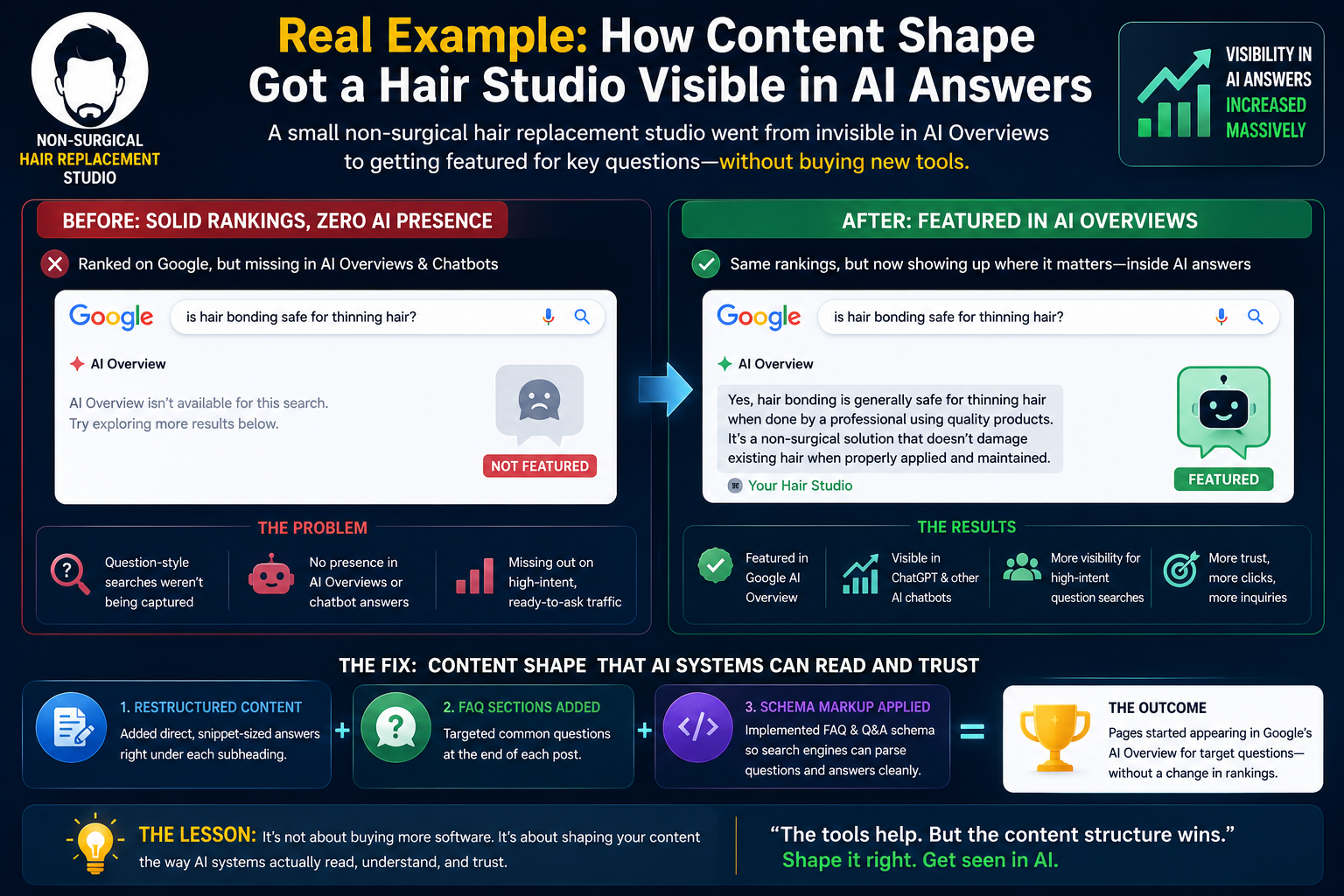
A small non-surgical hair replacement studio we worked with had solid Google rankings for its core city keywords but almost no presence when someone phrased their search as a question, things like “is hair bonding safe for thinning hair” or “how long does a hair patch last.” Those question-style searches are exactly what AI Overviews and chatbots tend to pull answers for.
The fix wasn’t a new tool; it was a new content shape. Existing blog posts got restructured with direct, snippet-sized answers right under each subheading, FAQ sections added at the end, and schema markup applied so search engines could parse the question and answer pairs cleanly. Within a few months, several of those pages started appearing inside Google’s AI Overview for their target questions, something they’d never shown up in before. Rankings on the classic results didn’t really move. The visibility inside AI answers did.
The lesson there isn’t “buy more software.” It’s that the tools only help once your content is shaped the way these systems actually read it.
Expert tips for getting more out of these tools
Treat every blog post like it might get pulled into an AI answer, even if it never has before. That means a direct, complete answer in the first two or three sentences after each heading, not a slow windup.
Use your content tool’s scoring as a diagnostic for what’s missing from your draft, not as the actual writing process. The best content we’ve seen still comes from someone who knows the subject writing first, then checking the tool second.
If you’re on a tight budget, prioritize an AI visibility tracker over a fancier content tool. You can’t fix what you can’t see, and right now most small businesses have zero idea whether they’re being mentioned by AI systems at all.
Don’t ignore Google Search Console. It’s free, it’s first party data straight from Google, and it still tells you things no third party tool can, including which queries are triggering AI Overviews on your existing pages.
Frequently asked questions
What is the best free AI SEO tool for small businesses?
Google Search Console paired with Rank Math’s free WordPress plugin covers most of what a small business needs to start: technical health, basic content optimization, and direct performance data from Google itself.
Do I need a separate tool for AI visibility tracking?
Yes, for now. Traditional rank trackers don’t show you whether ChatGPT or Perplexity mention your business, since that data lives outside Google’s standard search results. A dedicated tool like Otterly fills that gap.
How much should a small business budget for AI SEO tools?
Most small businesses can run an effective stack for somewhere between 50 and 150 dollars a month, combining one content tool, one tracking tool, and the free Google tools already available.
Can AI SEO tools replace a content writer?
Not really. They speed up research, scoring, and technical fixes, but the actual writing still needs a human voice, real experience, and judgment that AI drafts consistently lack on their own.
What's the difference between SEO and GEO?
SEO optimizes for ranking in traditional search results. GEO, generative engine optimization, focuses on getting your content cited or summarized inside AI generated answers on platforms like ChatGPT and Google’s AI Overviews.
Is Surfer SEO worth it for a small business?
It depends on your content volume. If you’re publishing four or more pieces a month, the Content Editor usually pays for itself in time saved. If you’re publishing once a month, it’s probably more tool than you need right now.
How do I know if my content is showing up in AI Overviews?
Check Google Search Console’s performance reports, which now flag AI Overview appearances separately from standard organic results, or use a dedicated visibility tracker for a clearer picture across multiple platforms.
Does WordPress need a paid SEO plugin?
Not necessarily. Rank Math’s free version handles schema, sitemaps, and on page analysis well enough for most small business sites. The paid tier mainly adds AI content credits and higher keyword tracking limits.
Are AI generated blog posts bad for SEO?
Not inherently, but unedited, fully automated content tends to read generic and often fails Google’s quality standards. The tools work best as a drafting aid that a real person then edits, fact checks, and adds genuine experience to.
How often should I check my AI SEO tool stack?
A monthly check on performance data is reasonable, with a full review of which tools you’re actually using every three months to avoid paying for subscriptions that have quietly stopped earning their place.
Key takeaways
- AI search has changed the game enough that ranking alone isn’t the full picture anymore. Getting cited inside AI answers now drives a meaningful share of clicks.
- The right tool stack depends on your specific bottleneck, not on which platform has the longest feature list.
- A research tool, a content tool, and an AI visibility tracker is enough for most small businesses. You rarely need more than three.
- Free tools, especially Google Search Console and Rank Math’s free tier, still carry a lot of the weight for businesses just getting started.
- Content shaped for direct answers, with FAQs and schema markup, performs better in both classic search and AI-generated answers.
Bringing it together
None of this works as a substitute for understanding your customers and writing content that actually helps them. The tools speed up research, flag what’s missing, and show you where you stand against competitors, but the judgment still has to come from someone who knows the business. Pick one tool from each category above, commit to using it properly for a real quarter, and you’ll have a clearer picture of where your money’s actually working than most small businesses ever get.
If you’re not sure where your specific bottleneck is, that’s usually the first thing worth figuring out before spending another dollar on software.