

Here’s something nobody tells beginners. You do not need three lakh rupees or a coding degree to put a real, working website online today Build a Website Without Investment
Most people think a website means hiring a developer, paying for hosting, buying a premium theme, and waiting weeks. That was true maybe ten years back. Not anymore.
I have watched small business owners in Vizag and Hyderabad get stuck for months just because someone quoted them fifty thousand rupees for “just a website.” Meanwhile their competitor launched one over a weekend using free tools and started getting leads within days.
This guide is going to show you exactly how that is possible, step by step, without touching your wallet.
Table of Contents
ToggleIntroduction
A website used to be a luxury. Now it is closer to a basic requirement, like having a phone number.
Whether you run a salon, sell handmade jewelry, teach guitar, or freelance as a designer, people search for you online before they ever call you. If there is nothing to find, you lose that customer before the conversation even starts.
The good news is that building a professional looking website with zero investment is genuinely possible in 2026. You just need to know which free tools actually work, how to structure your site so it looks credible, and a few tricks that make free platforms look expensive.
By the end of this guide, you will know exactly which tools to use, how to set everything up, and what mistakes to avoid so your “free” website does not end up looking like a free website.
Quick Answer Build a Website Without Investment
You can build a free professional website using platforms like WordPress.com, Wix, Google Sites, or Carrd, paired with free hosting from GitHub Pages or Netlify if you want a custom coded site. Add a free domain option or connect a low cost domain later, use free stock images from Unsplash or Pexels, and write clear, simple content. With the right structure and design choices, nobody can tell it did not cost you anything.
What Is a Free Website Really?
A free website is simply a site built using no paid software, no paid hosting, and no paid design tools, while still functioning like any paid website would.
Think of it like cooking a restaurant quality meal at home using ingredients from your own kitchen instead of ordering out. The result can taste just as good if you know what you are doing.
For example, a home baker in Hyderabad recently built her entire ordering website using Google Sites and a free WhatsApp click to chat button. No developer, no hosting fee, and it looks clean enough that customers assumed she had paid a design agency.
Why Is It Important?
A website builds trust before you even speak to the customer. People check if a business is “real” by looking for a website, reviews, and social proof.
It also works while you sleep. Someone searching at 11pm can land on your site, read about your service, and message you on WhatsApp without waiting for business hours.
And for local businesses especially, a basic website helps with local SEO. Google trusts businesses with an online presence more than ones with only a Instagram page.
The cost of not having one is invisible but real. You are simply losing customers to whoever showed up first in search results.
Complete Step by Step Guide
Step 1: Choose the Right Free Platform
What It Means
This is picking the tool you will actually build your website on. Not all free platforms are equal, so this decision matters more than people realize.
Why It Matters
Choosing the wrong platform means you might hit a wall later, like not being able to add a contact form or getting stuck with ugly templates you cannot customize.
How To Do It
For most beginners, WordPress.com free plan or Wix free plan works best because both offer decent templates and are beginner friendly. If you want something even simpler, Google Sites is drag and drop and takes under an hour to learn. If you are comfortable with a little technical work, GitHub Pages lets you host a fully custom coded website for free forever.
Example
A tuition center owner in Vizag used Wix free plan to build a five page website in one evening, including a contact form and a photo gallery of the classroom.
Pro Tip
Pick based on how much control you want. Wix and WordPress are faster to start. GitHub Pages gives more freedom but needs some HTML knowledge.
Step 2: Get a Domain Name Without Paying Full Price
What It Means
Your domain is your website address, like yourbusiness.com. Most free platforms give you a subdomain like yourbusiness.wixsite.com, which works fine to start.
Why It Matters
A custom domain looks more professional, but you do not need to buy one on day one. Start with the free subdomain and upgrade later once you have traction.
How To Do It
Use the free subdomain your platform gives you initially. Once your business grows, domains cost as little as a few hundred rupees a year from providers like Namecheap or GoDaddy, so this becomes your only real investment down the line, and even that is optional at the start.
Example
Antidot Hair Studio started with a free Wix subdomain for their first three months before moving to a custom domain once bookings picked up.
Pro Tip
Do not delay launching your website just because you cannot afford a domain yet. A working free subdomain site beats an empty “coming soon” page every single time.
Step 3: Pick a Clean, Simple Template
What It Means
Your template is the visual skeleton of your website, the layout, fonts, and color scheme.
Why It Matters
A cluttered or outdated template makes even good content look untrustworthy. Simplicity almost always wins.
How To Do It
Choose a template with plenty of white space, a clear menu bar, and no more than two or three fonts. Avoid templates packed with sliders, popups, or auto playing music, since these feel dated and slow down your site.
Example
A freelance photographer switched from a busy, image heavy template to a minimal one with large photos and short text. Client inquiries went up because visitors could actually find the contact button.
Pro Tip
When in doubt, pick the simplest template on the list. Simple almost always looks more expensive than busy.
Step 4: Write Content That Sounds Human
What It Means
This is the actual text on your website: your homepage message, about section, services, and contact page.
Why It Matters
Visitors decide within seconds whether to trust your business. Robotic, overly formal, or copy pasted content kills that trust instantly.
How To Do It
Write like you are explaining your business to a friend. Mention what you do, who you help, and why someone should choose you. Keep sentences short. Avoid generic lines like “we provide quality services to our esteemed clients.”
Example
Instead of “We offer premium hair care solutions,” a hair studio wrote “Struggling with thinning hair and tired of solutions that do not work? We have helped over 200 clients in Vizag get natural looking hair back.”
Pro Tip
Read your content out loud. If it sounds like something you would never actually say to a person, rewrite it.
Step 5: Add Free Images That Do Not Look Stock
What It Means
Visuals matter as much as text. Free stock photo sites give you professional images without any cost.
Why It Matters
Blurry phone photos or generic clipart make a website feel unfinished, even if the content is great.
How To Do It
Use Unsplash, Pexels, or Pixabay for free high quality photos. Where possible, mix in a few real photos of your actual product, team, or workspace, since real photos build more trust than stock images alone.
Example
A local bakery combined a few stock photos of pastries with real photos of their own storefront and staff, which made the site feel authentic instead of generic.
Pro Tip
Avoid the most overused stock photos, like people shaking hands in suits. Search specific terms related to your niche instead of generic business terms.
Step 6: Set Up Free Hosting (If You Went the Coded Route)
What It Means
If you built a custom HTML website instead of using a platform like Wix, you need somewhere to host those files so people can visit your site.
Why It Matters
Without hosting, your website only exists on your own computer. Nobody else can see it.
How To Do It
GitHub Pages and Netlify both offer completely free hosting for static websites. Upload your files, connect your GitHub repository, and your site goes live with a free URL within minutes.
Example
A NexasAI intern built a personal portfolio site using plain HTML and CSS, then hosted it free on GitHub Pages, complete with a working contact form using a free form service.
Pro Tip
Netlify is slightly more beginner friendly than GitHub Pages if you are not comfortable with Git commands yet.
Step 7: Add a WhatsApp or Contact Option
What It Means
This is how visitors actually reach you after browsing your site.
Why It Matters
A website without a clear way to contact you is like a shop with no door. People will leave instead of figuring out how to reach you.
How To Do It
Add a floating WhatsApp button using a free widget, or a simple contact form using free tools like Google Forms embedded into your page. Make sure this button is visible on every page, not buried somewhere.
Example
A local gym added a “Message on WhatsApp” button to their homepage and saw inquiries jump because people did not need to type an email or fill a long form.
Pro Tip
WhatsApp converts better than email for most local businesses in India, so prioritize that over a traditional contact form.
Step 8: Test on Mobile Before Launching
What It Means
Checking how your website looks and behaves on a phone screen, not just a laptop.
Why It Matters
Most visitors will find you through mobile search. If your site looks broken or slow on a phone, you lose them immediately.
How To Do It
Open your website on your own phone and check every page. Look for text that is too small, buttons that are hard to tap, or images that take too long to load.
Example
A boutique owner discovered her menu bar was completely hidden on mobile until she tested it herself, something her free builder’s preview on desktop never showed.
Pro Tip
Ask two or three friends with different phone brands to open your site and tell you honestly if anything feels off.
Common Mistakes
Mistake: Choosing a template with too many animations and effects.
Impact: Makes the site slow and distracting, pushing visitors away.
Solution: Stick to clean, minimal designs with fast loading times.
Mistake: Writing content that sounds like a brochure.
Impact: Visitors do not connect emotionally and bounce quickly.
Solution: Write conversationally, like you are talking to one specific person.
Mistake: Forgetting to add a clear call to action.
Impact: Visitors read your content but never take the next step.
Solution: Add buttons like “Message us on WhatsApp” or “Book a free consultation” on every page.
Mistake: Ignoring mobile optimization.
Impact: Most traffic comes from phones, and a broken mobile layout kills conversions.
Solution: Always preview and test on an actual mobile device before going live.
Mistake: Using too many stock images that look fake.
Impact: Reduces trust and makes the business feel less genuine.
Solution: Mix real photos with a few carefully chosen stock images.
Best Practices
Keep your homepage focused on one clear message about what you do and who you help.
Use consistent colors and fonts across every page instead of switching styles randomly.
Update your website every few months, even small changes like new photos or a new testimonial, since fresh content signals to Google that your site is active.
Add basic SEO details like page titles and meta descriptions, since most free builders let you edit these without any coding.
Always include a way to contact you above the fold, meaning visible without scrolling.
Tools and Resources
| Tool | Best For | Cost |
|---|---|---|
| WordPress.com | Blogs and business sites | Free plan available |
| Wix | Beginner friendly drag and drop sites | Free plan available |
| Google Sites | Extremely simple sites | Completely free |
| GitHub Pages | Custom coded static websites | Completely free |
| Netlify | Hosting coded websites | Free tier available |
| Unsplash and Pexels | Stock photography | Completely free |
| Google Forms | Simple contact forms | Completely free |
| Canva | Logos and graphics | Free plan available |
Real-Life Example
Situation
A small non surgical hair replacement studio in Vizag wanted an online presence but had already spent most of their budget setting up the physical space.
Challenge
They needed a website that looked trustworthy enough to compete with bigger clinics in Hyderabad, without spending a single rupee on development.
Action
Using Wix free plan, they built a five page site including a homepage, services page, before and after gallery using real client photos, an about page, and a WhatsApp contact button. Content was written in simple, relatable language focused on common customer worries like “will people notice” and “how natural will it look.”
Result
Within the first month, the website generated consistent WhatsApp inquiries, and several customers mentioned they chose this studio over competitors because the website felt more personal and easier to understand.
Expert Tips
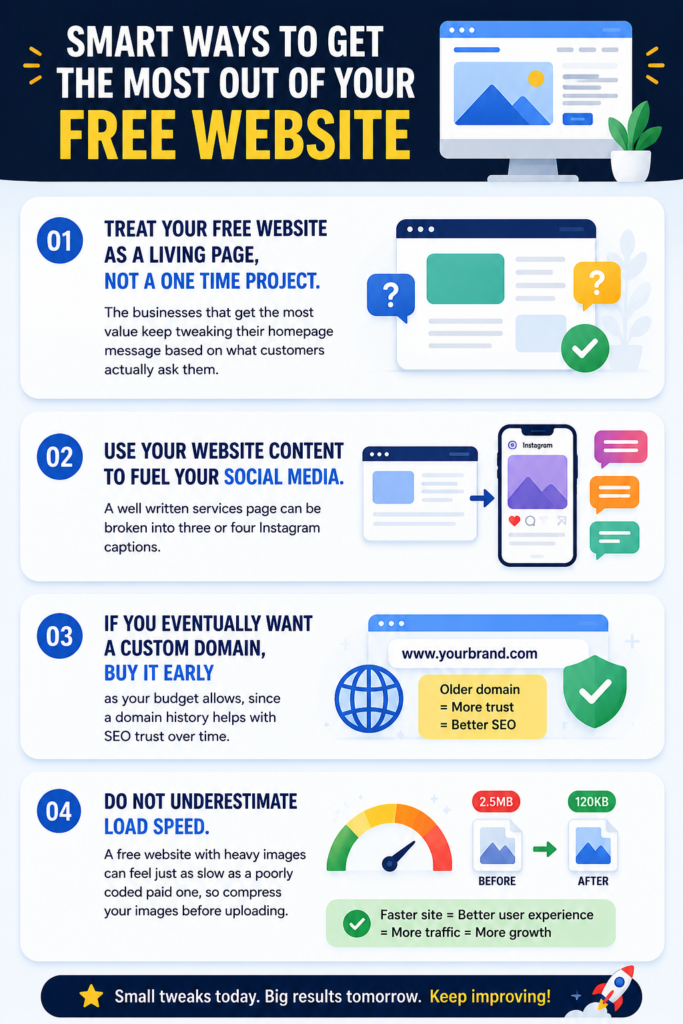
Treat your free website as a living page, not a one time project. The businesses that get the most value keep tweaking their homepage message based on what customers actually ask them.
Use your website content to also fuel your social media. A well written services page can be broken into three or four Instagram captions.
If you eventually want a custom domain, buy it as early as your budget allows, since a domain history helps with SEO trust over time.
Do not underestimate load speed. A free website with heavy images can feel just as slow as a poorly coded paid one, so compress your images before uploading.
Frequently Asked Questions
Can I really build a website with zero cost?
Yes, platforms like Wix, WordPress.com, and Google Sites all offer genuinely free plans that let you build and publish a working website without paying anything.
Do free websites look unprofessional?
Not if you choose a clean template, write good content, and use quality images. Many free websites look identical to paid ones from a visitor’s perspective.
How long does it take to build a free website?
A simple five page website can be built in three to six hours using drag and drop builders, even without prior experience.
Is a free subdomain bad for SEO?
A free subdomain works fine when starting out. It is not ideal long term, but it will not stop your site from ranking or getting traffic in the early stages.
Which free platform is best for a small local business?
Wix or WordPress.com are usually the easiest choices for local businesses because of their built in templates and simple editing tools.
Can I add a contact form for free?
Yes, Google Forms can be embedded into most website builders for free, giving you a working contact form without any coding.
Do I need coding knowledge to build a free website?
No, unless you want a fully custom coded site. Builders like Wix and Google Sites use drag and drop editors that require no coding at all.
How do I get free images for my website?
Unsplash, Pexels, and Pixabay all offer high resolution, royalty free images you can use without attribution in most cases.
Can a free website help with local SEO?
Yes, as long as you add your business name, location, and services clearly in your content, along with basic meta descriptions.
Should I upgrade to a paid plan later?
Once your business starts generating consistent leads, upgrading for a custom domain and removing platform branding is a reasonable next step, but it is never required to get started.
Key Takeaways
- You do not need money to launch a real, working website today
- Wix, WordPress.com, and Google Sites are the easiest free platforms for beginners
- GitHub Pages and Netlify offer free hosting if you prefer a custom coded site
- Simple templates and honest, conversational content outperform flashy designs
- Free stock photos combined with real photos build more trust
- A visible WhatsApp or contact button is essential for conversions
- Testing on mobile before launch prevents losing visitors to a broken layout
- Your free website should be updated regularly, not built once and forgotten
Conclusion
Building a website used to feel like a privilege reserved for businesses with a marketing budget. That is simply not true anymore.
With the right free tools, a bit of patience, and content that actually sounds like you, anyone can put together a website that competes with businesses spending lakhs on development.
The real cost of waiting is not money. It is the customers who are searching for exactly what you offer right now and finding someone else instead.
CTA
If you want your website to not just exist but actually bring in leads and bookings, that is where the real work begins after launch.
Message us on WhatsApp and we will help you turn your free website into one that consistently brings in customers, without the guesswork.